FlitKey vs aText: Which Text Expander Should You Actually Use?
Key Takeaways
- aText ($4.99/yr or $29.99 lifetime) supports macOS and Windows with rich text and cloud sync, but lacks a Linux version.
- FlitKey (free, MIT) runs on Windows and Linux with local JSON storage, zero tracking, and no paid tiers.
- FlitKey imports aText CSV snippet libraries directly for quick migrations.
Disclosure: we make FlitKey, so aText is a competitor of ours. We've tried to describe it accurately, including the things it does better than we do. Every price and version below was checked against aText's official pages in August 2026.
Both tools do the same core job: type a short abbreviation and a longer block of text appears wherever you were typing. Both run in the background, both work in any desktop app, and both will spare you from retyping your email signature for the thousandth time.
That's about where the similarities stop.
The decision comes down to two things: which operating systems you type on, and whether rich text plus sync matters more to you than free, open-source, and offline. Everything else follows from those two answers.
FlitKey vs aText at a glance
| Criterion | FlitKey | aText |
|---|---|---|
| Price | $0, free and MIT-licensed | $4.99/year or $29.99 lifetime (personal) |
| Platforms | Windows 10/11, Linux (X11 full, Wayland partial) | macOS 10.12–15, Windows |
| Linux support | Yes | No |
| macOS support | No | Yes |
| Open source | Yes (source on GitHub) | No (proprietary) |
| Offline / privacy | Fully offline, no account, no telemetry | Local app; cloud sync optional; online license activation |
| Rich text & images | No, plain text with dynamic placeholders | Yes: formatted text, images, attachments |
| Cloud sync | No | Via Dropbox, OneDrive, Google Drive, iCloud |
| Import from other tools | Espanso (.yml), AutoHotkey (.ahk), CSV, TSV, JSON | No documented importer for competitor formats |
| Starter content | 6 built-in packs, 46 snippets | Built-in misspelling, HTML/JS, emoji snippets |
The core difference: a paid cross-device tool vs a free local one
aText is a classic one-developer commercial utility from Trần Kỳ Nam, sold since the early 2010s. It treats text expansion as a personal productivity product: rich formatting, auto-correction, fill-in fields, scripting, and snippet libraries that follow you between your Mac and your Windows PC through whatever cloud drive you already use.
FlitKey treats text expansion as local infrastructure. It's free, open-source under the MIT license, and deliberately offline; there's no account, no server behind it, and no telemetry. Your snippet library is a set of files on your machine, and the app never makes a network call. Because the source is public, that last claim is one you can check with tcpdump rather than take on faith.
Neither philosophy is wrong. One buys convenience across devices; the other trades it for control and a price of zero.
What is aText?
aText is a text expansion tool for macOS and Windows from Tran Ky Nam Software. The current versions are 3.21 for macOS (released July 2024) and 1.41 for Windows (released September 2024). The macOS build comes with a 21-day free trial, and on Windows the developer recommends installing from the Microsoft Store.
Where aText is stronger
Mac users. aText supports macOS 10.12 through 15, and FlitKey has no macOS build at all. If you type on a Mac, this comparison is already over; aText is the answer.
Rich text, images, and attachments. aText drops formatted text, images, and attachments straight into Word, Outlook, Gmail, Pages, and Mail. If your snippets are formatted email templates with logos rather than plain paragraphs, aText handles a job FlitKey doesn't attempt.
Auto-correction. It capitalizes new sentences and fixes double capitals as you type, which sits outside what a pure expander does.
Cross-device sync. Snippets sync between computers, including between a Mac and a Windows PC, via Dropbox, OneDrive, Google Drive, iCloud Drive, or a shared network folder. Several people can work from a shared library that way too.
A long track record at a low price. Independent roundups keep filing aText as the budget pick of the category: solid expansion at $4.99 a year while TextExpander runs $39.96. That reputation took more than a decade of releases to earn.
aText limitations
No Linux version. If any of your machines run Ubuntu, Debian, Mint, or Pop!_OS, aText covers none of them.
Licensing has real fine print. The $4.99 personal license lasts one year and covers 3 computers, while the $29.99 lifetime license covers 5 computers, allows at most 5 activations per year, and requires a one-time online activation per machine. The Floating license needs a permanent internet connection. None of this is hidden, it's all on the official buy page, but "one-time purchase" comes with conditions.
It's proprietary. You can't audit what a background app that reads your keystrokes actually does; you can only trust the developer's privacy policy. For most people that's fine. In some environments it won't be.
Development is steady but slow. The newest releases shipped in 2024. That isn't abandonment, since aText has been maintained for well over a decade, but don't expect a rapid feature cadence.
What is FlitKey?
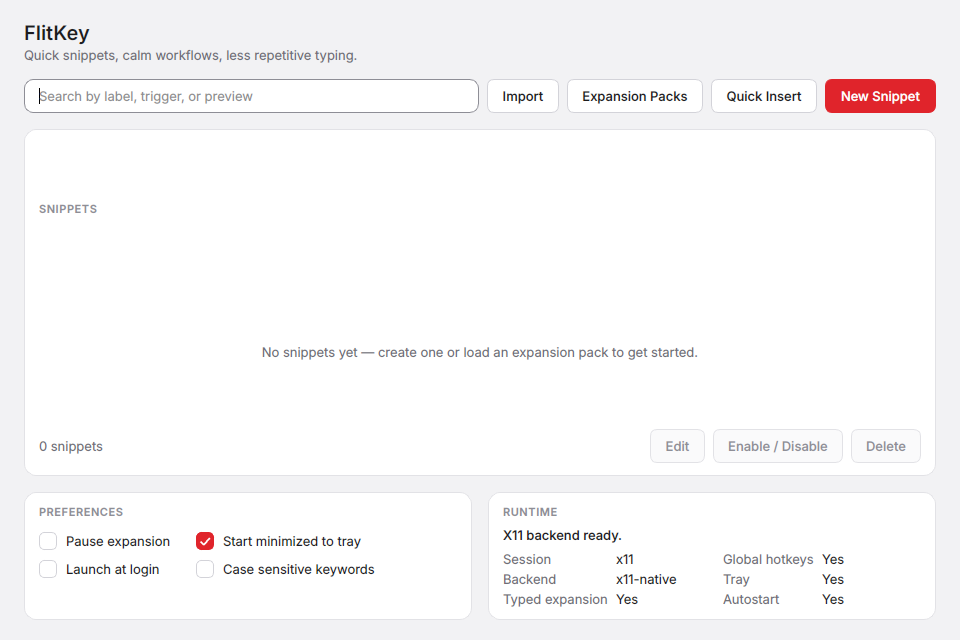
FlitKey is a free, open-source text expander for Windows 10/11 and Linux, currently at v0.6.0. It's built in the open by a named developer, Swaraj Nandedkar, with the full source on GitHub under the MIT license.
Where FlitKey is stronger
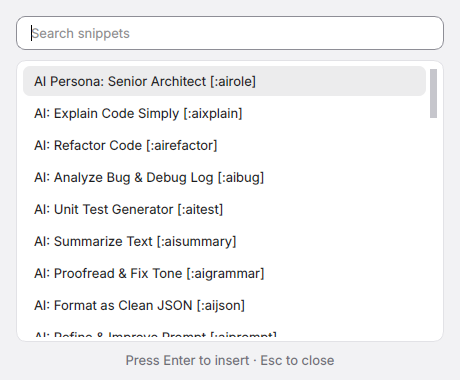
Free means free. No tiers, no trial, no account, no card. Every feature ships in the one free build: unlimited snippets, the Alt+Space searchable picker, dynamic date, time and clipboard placeholders, {{cursor}} positioning, tray controls, and all the importers. Nothing in the app is written to steer you toward a paywall, because there's no server bill to cover.
Linux users. FlitKey is one of the few text expanders that treats Linux as a first-class platform, with full typed-trigger expansion on X11 and a picker-plus-clipboard workflow on Wayland. It ships as a 2.7 MB .deb for Debian, Ubuntu, Mint, and Pop!_OS, or you can run it from source.
Verifiable privacy. FlitKey runs entirely on your machine. A text expander necessarily watches your keystrokes, so being able to read the code and confirm the absence of network traffic matters more in this category than almost any other. See the privacy and security guides for the broader workflow.
Migration, not lock-in. FlitKey imports Espanso .yml, AutoHotkey .ahk, and CSV, TSV, and JSON libraries in one automated pass. Complex scripts and forms need manual review; the migration guide covers what transfers and what doesn't.
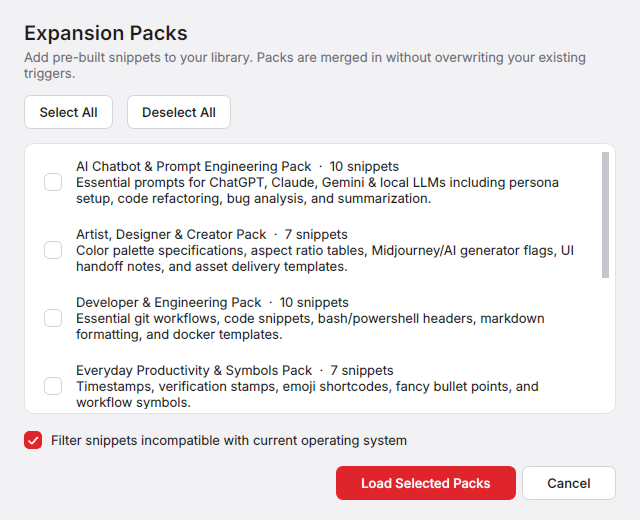
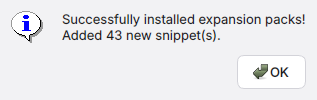
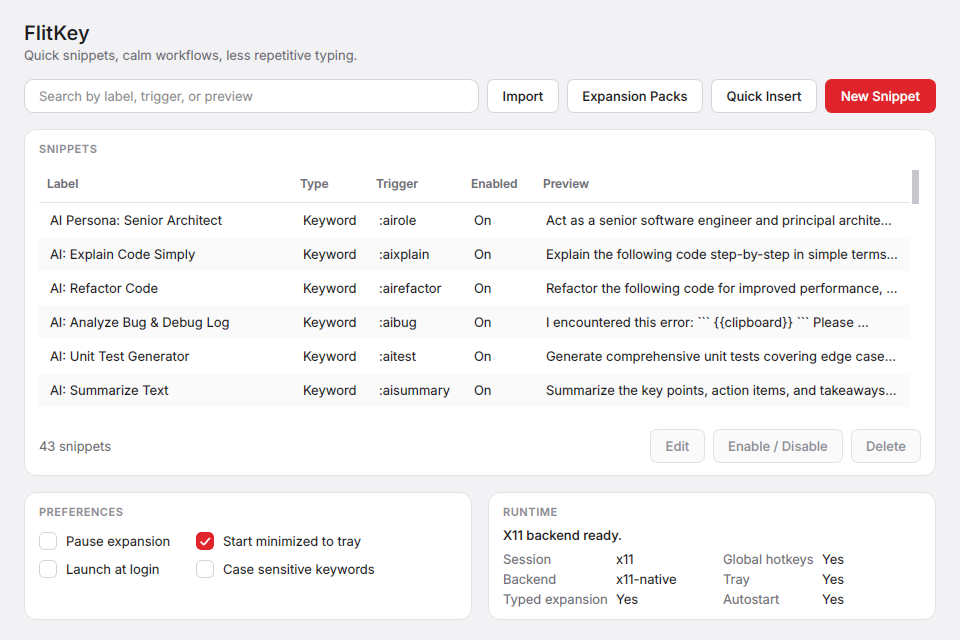
You don't start from zero. v0.6.0 ships six built-in expansion packs, 46 snippets in total, covering AI prompts, development, customer support, sysadmin work, design, and daily productivity. Packs merge into your library without overwriting triggers you already use.
FlitKey limitations
No macOS build. Mac users should use aText or another Mac-native tool.
No rich text. FlitKey is plain-text-first: dynamic dates, clipboard content, and cursor placement, but not formatted text, images, or attachments the way aText does them.
Wayland is partial. The Wayland protocol blocks every app from intercepting global keystrokes, which limits Espanso and AutoKey the same way, so on Wayland you use the snippet picker with clipboard paste instead of typed triggers. Full details are in the Wayland guide.
It's young, and it looks it. FlitKey sits at v0.6.0, its Windows installer isn't code-signed yet (SmartScreen shows an "Unknown Publisher" warning on first install), and there's no cloud sync or built-in team sharing. All of that is documented in the support matrix rather than hidden, but it's real.
Feature-by-feature comparison
| Feature | FlitKey | aText |
|---|---|---|
| Typed abbreviation expansion | Yes (Windows, Linux X11) | Yes (macOS, Windows) |
| Searchable snippet picker | Alt+Space overlay | Snippet search in app |
| Dynamic dates & times | Yes | Yes, incl. date/time scripts |
| Clipboard insertion | Yes | Yes |
| Cursor positioning | {{cursor}} marker | Yes |
| Fill-in / editable fields | No | Yes |
| Scripting | No | Yes (script snippets, key strokes, mouse) |
| Rich text & images | No | Yes |
| Auto-correction | No | Yes |
| Starter snippet packs | 6 packs, 46 snippets | Misspellings, HTML/JS, emoji |
| Import from Espanso / AutoHotkey | Yes | No |
| Import from CSV / TSV / JSON | Yes | No documented support |
| Cloud sync | No (by design) | Dropbox, OneDrive, Google Drive, iCloud |
| Works in VMs / remote desktop | Not documented | Yes, documented |
| License | MIT, open source | Proprietary |
| Price | $0 | $4.99/yr, $29.99 lifetime |
Trying FlitKey without abandoning your library
The practical worry when switching expanders is losing your snippets. FlitKey's CSV importer makes the trial reversible: put your snippets in a two-column CSV and import them in one click.
aText has no documented export in a competitor-readable format, so moving an existing aText library means rebuilding it, via CSV if you can get your snippets into a spreadsheet or by hand if you can't. Going the other way, from Espanso or AutoHotkey into FlitKey, is automated.
trigger,expansion
;sig,"Best regards,\nJane Smith\nSenior Engineer"
/date,{{date:%Y-%m-%d}}
;addr,"221B Baker Street\nLondon NW1 6XE"
;meet,https://cal.example.com/jane/30min
What each option costs over three years
aText first, since it's the one with a price. For one person:
- aText Personal One year: $4.99 × 3 = $14.97 over three years (3 computers, renewed annually)
- aText Personal Lifetime: $29.99 once (5 computers, max 5 activations/year)
- FlitKey: $0, unlimited machines, no activation
Let's be fair to aText here. Thirty dollars once, for a tool you'll use daily for years, is excellent value, and against subscription tools like TextExpander at $39.96 per year it wins the value argument without breaking a sweat.
But "free" and "cheap" are different categories. FlitKey has no activation limits, no per-computer count, and no renewal date, and because there's no online activation step it also works on machines that never touch the internet.
Choose FlitKey if
- You work on Linux, or split time between Linux and Windows.
- You want open-source software you can audit, fork, or build yourself.
- You need a tool that runs fully offline, whether for air-gapped machines, strict IT environments, or plain preference.
- You're migrating from Espanso or AutoHotkey and want your library imported automatically instead of retyped.
- You want every feature for $0.
Choose aText if
- You type on a Mac. FlitKey doesn't run there, full stop.
- Your snippets need formatted text, images, or attachments.
- You want your library synced across computers through a cloud drive you already use.
- You'll use fill-in fields, scripting, or auto-correction.
- You prefer a tool with a decade-plus track record and are happy to pay $4.99–$29.99 for it.
Use both if
- You run aText on your Mac and FlitKey on your Linux or Windows machines. They don't conflict across separate computers, and your total spend is still just aText's license.
Frequently asked questions
Does aText work on Linux?
No. aText supports macOS 10.12–15 and Windows only. For Linux text expansion the realistic options are FlitKey, Espanso, or AutoKey, and on Wayland all of them fall back to picker or clipboard workflows because the protocol blocks global keystroke interception.
Is aText a one-time purchase?
The $29.99 Personal Lifetime license is one-time, covering 5 computers with up to 5 activations per year and a one-time online activation per machine. The $4.99 Personal license lasts one year and covers 3 computers. Business and Floating licenses carry their own terms, so check the official buy page before purchasing.
Is FlitKey really free, or is there a paid tier coming?
FlitKey is MIT-licensed and fully open source, and every feature ships in the free version. There is no paid tier, trial, or account, and because the app runs entirely locally with no server infrastructure, there's no ongoing cost that would need to be monetized.
Can I import my aText snippets into FlitKey?
Not automatically. FlitKey imports Espanso .yml, AutoHotkey .ahk, and CSV/TSV/JSON files, but aText has no documented export in those formats. If you can get your aText snippets into a two-column CSV (trigger, expansion), FlitKey will import them in one click; otherwise plan on manual re-creation.
Why does Windows warn me when installing FlitKey?
FlitKey's installer isn't code-signed yet, so SmartScreen shows an "Unknown Publisher" notice. Choose "More info," then "Run anyway." The full source is public on GitHub if you'd rather audit or build it yourself. aText, distributed through the Microsoft Store, doesn't trigger this warning.
So which one should you install?
On a Mac, buy aText; $29.99 lifetime for rich-text expansion with sync is a fair deal, and FlitKey can't serve you there. On Linux, FlitKey is the obvious pick: free, open source, native, and one of the few tools that treats your platform as first-class. On Windows the honest split is this: aText for formatted snippets and cross-device sync at a small price, FlitKey for auditable, offline, plain-text expansion at no price at all.
Explore the FlitKey comparisons hub for the other product comparisons.